Running Conquest on a Synology NAS or elsewhere using Docker

  • Hi,

    at work we have a Synology NAS that is used to store multiple large static medical image collections.

    I wanted to install conquest to make several 10TB archives accessible in read-only mode. These are my steps for each archive:

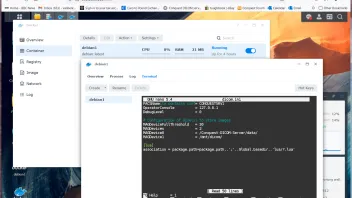
    install and start Docker on the synology

    registry - debian - download this image

    for each archive:

    registry - debian - lauch

    give container a name

    advanced settings

    volume - add folder (local where the images are) mount path e.g. /mnt/dicom, enable readonly if you want

    port settings map local port 5678 to 5678, map local port 8080 to 80 (use e.g. local port 5679 and 8081 for a second container)

    apply

    detail of running container

    terminal

    apt update

    apt -y install make sudo nano systemctl gettext-base

    apt -y install git apache2 php libapache2-mod-php git g++ lua5.1 liblua5.1-0 lua-socket p7zip-full

    ln -s /usr/lib/x86_64-linux-gnu/liblua5.1.so.0 /usr/lib/x86_64-linux-gnu/liblua5.1.so

    a2enmod rewrite

    sed -i 's/AllowOverride None/AllowOverride All/g' /etc/apache2/apache2.conf

    sed -i 's/memory_limit = 128M/memory_limit = 512M/g' /etc/php/7.4/apache2/php.ini

    sed -i 's/upload_max_filesize = 2M/upload_max_filesize = 250M/g' /etc/php/7.4/apache2/php.ini

    sed -i 's/post_max_size = 8M/post_max_size = 250M/g' /etc/php/7.4/apache2/php.ini

    systemctl restart apache2

    git clone https://github.com/marcelvanherk/Conquest-DICOM-Server

    cd Conquest-DICOM-Server

    chmod 777 maklinux

    chmod 777 linux/regen

    chmod 777 linux/updatelinux

    chmod 777 linux/restart

    ./maklinux

    (choose options 3, yes, yes)

    nano dicom.ini

    change MAGDevice lines as folllows:

    MagDevices = 2

    MagDevice0 = /Conquest-DICOM-Server/data/ (keep as it was, used for temporary storage and inadvertently incoming data)

    MagDevice1 = /mnt/dicom/

    systemctl restart conquest.service

    ./dgate -v -r

    after regeneration is done (can take a long time)

    systemctl restart conquest.service

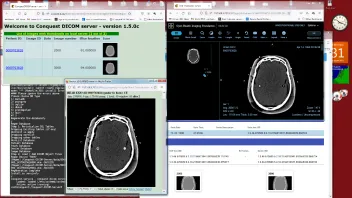
    Now your DICOM server is running on the NAS, at port 5678 (5679)

    Its web interface is also on the NAS, at port 8080 (8081) e.g. IP:8080/app/newweb/

    It is a good idea to backup setting using

    Container - Settings - Export (include the image)

    Have fun!
    Marcel van Herk is developer of the Conquest DICOM server together with Lambert Zijp.

    Edited 3 times, last by marcelvanherk: Web stuff to apps, php (August 31, 2022 at 10:52 AM).

  • The only issue is that every time the container is restarted, you have to start conquest and apache manually in the terminal with:

    systemctl restart conquest.service

    systemctl restart apache2

    looking for a solution for that. (A restart script is now provided in 1.5.0c)

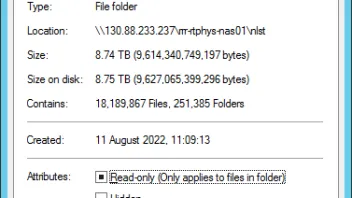
    Otherwise performance is great (It did a 9TB database regenerate in about 12 hours, initially reading ~1000 CT slices per second). I did use xterm as terminal which seems to be faster than the built-in terminal in Synology Docker. The sqlite database is over 1Gb, and in the end it does slow things down a bit. There are over 18 million images in my test database (NLST), which is maybe a bit much for SqlLite.

    Marcel

    Marcel van Herk is developer of the Conquest DICOM server together with Lambert Zijp.

    Edited 4 times, last by marcelvanherk (August 29, 2022 at 1:21 AM).

  • In the 1.5.0c release, also a Dockerfile (below) is included allowing you to generate a non-persistent test server very quickly.

    The code show how to run and build it!

    Marcel van Herk is developer of the Conquest DICOM server together with Lambert Zijp.

    Edited 2 times, last by marcelvanherk (August 31, 2022 at 11:27 PM).

  • Hi,

    Despite my best efforts, I could not make conquest to start autimatically at startup of the docker image. How can I make the "restart" script to exectue at startup (I tried putting into init.d folder and I ran "update-rc.d restart defaults" after)? I use the 1.5.0e version and the latest version of Debian.

    Emanuel

Participate now!

Don’t have an account yet? Register yourself now and be a part of our community!