
• Dear Conquest users and friends,

    This is the 1.5.0g release. It adds date shift in anonymisation, sqlite backup, compilation with lua built-in on Linux, support for streaming web-services, access control on IP address, several security enhancements, and several bug fixes.

    You can download the release here (150g4 version has access control fixes up to 9 October 2026 and Rows/Columns and filename SOPUID fix 13 October:

    http://natura-ingenium.nl/dicomserver/dicomserver150g4.zip

    This is the corresponding Github commit for 1.5.0g:

    And for 1.5.0g4:

    GitHub - marcelvanherk/Conquest-DICOM-Server at 8e77e06728892c13346ec845e5b191609719d079
    Conquest DICOM server, aiming for complete source code release - marcelvanherk/Conquest-DICOM-Server
    github.com

    Latest Github: https://github.com/marcelvanherk/Conquest-DICOM-Server

    A big change in 1.5.0g is that many management and web options are by default only accessible from 127.0.0.1, including from the web interfaces. Please lookup AllowedIPs and DeniedIPs options for dicom.ini in the manuals to find out how to change this.

    Please find below help with updating. Please report bugs and successes!

    Marcel van Herk

    NOTE: accidentally in 1.5.0g DICOM communication is by default restricted to localhost. After install add AllowedIPs = * to dicom.ini to open all connectivity. This is fixed in 1.5.0g2 up.

    Example linux install/update for SQLite, updates when folder ./CONQUESTSRV1 exists:

    Code
    sudo apt install lua5.1
    rm installer.lua
    wget https://raw.githubusercontent.com/marcelvanherk/Conquest-DICOM-Server/master/install/installer.lua
    lua installer.lua -s CONQUESTSRV1 -p 5678 - d sqlite -y -r n

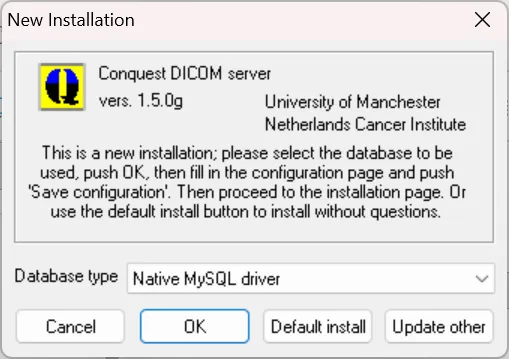
    Example update for Windows: Download 150g zip file and unzip to temporary location. Start ConquestDicomServer.exe. Use [Update other] button to copy binary files to existing server, and select the other ConquestDicomServer.exe. Note that this does NOT UPDATE webserver files OUTSIDE the Conquest folder. It is imperative to copy these manually e.g. from c:\dicomserver\webserver\htdocs to c:\xampp\htdocs to provide improved safety.
    Marcel van Herk is developer of the Conquest DICOM server together with Lambert Zijp.

    Edited 14 times, last by marcelvanherk: Updated github link for release (November 5, 2026 at 12:30 PM).

  • 1.5.0g has been released, as well as 1.5.0g4 with some access check fixes.

    This is the buglist, starting with leftover bugs from earlier versions, per category:

    GUI bugs:

    Web interface bugs:

    DICOM Communication bugs:

    C1) Multiple instance matching incomplete. Is documented.

    Installer bugs or limitations (low priority):

    Unconfirmed bugs:

    U1) last line of dicom.ini does not read if no CR - not reproduced

    Open bugs:

    Below ---- newly found bugs for 1.5.0g will be collected

    N1) Too long queries do not give a proper error message in GUI

    N2) Internal networking is unreliable on Centos7

    N3) data processed though incoming has CallingAE of 16 spaces in ImportConverter

    N4) export:xx,,,,binary does not work

    N5) Change or modify should not allow empty PatientIDs

    N6) I think autodelete only works when there is a single MAG device (-ff option). Documented.

    N7) the filenames in overview.lua are only suitable for windows

    N8) update or remove outdated or unused viewer start files (e.g. weasis)

    N9) deleting e.g. a RTPLAN from a study does not update StudyModality. Will not fix.

    N10) The clonedb: test command requires VirtualServerFor0 to be defined. Documented on Git

    N11) document that you must pass empty string (not nil) to changeuid to parameter if you want to use stage. In 1.5.0g

    N12) * in query does not match empty data; lua:if Data.AccessionNumber=='*' then Data.AccessionNumber = '' end. Database dependent: like '%' matching in the database does not match if an empty string is considered as NULL.

    N13) group lenghts of groups with sequences are not stored correctly (lsp). Suggest to no longer store group lenghts in files. Come on LSP!

    N14) mukoya: jl20 causes image corruption

    N15) Add thread number to log output

    N16) Built-in webserver does not run on 32 bits machine due to 64 bits socket dll. Will not fix, but to document.

    N17) settings DelayedForwarderThreads higher than 1 is not working correctly; see detailed post in this thread. Documented

    N18) built-in webserver crashes dgate under service, when local service login is used. Works with user login. To recheck

    N19) RenameOnRewrite default value not documented. On Git.

    N20) note that reading integer elements in Lua e.g. Command.MessageID returns them as a string. Documented on Git.

    N21) N# (private) lossy compression does not like signed data, e.g. enhanced CT. Will not fix now.

    ----- 1.5.0g release -----

    N22) Ladle webserver does not produce downloadable zip files.

    N23) Scheduled backup repeats for a few times if database is very small. Fixed on Git.

    N24) Using "map" as e.g. AllowedIPsZip will crash for more than ~70 entries in ACRNEMA.MAP (Marcin, message4231). Fixed on Git and in G2

    N25) op > 0 && op <= sizeof(opname)/sizeof(char *), should be <. No effect (Marcin, message4231). Fixed on Git and in G2

    N26) "map" is matched as a substring, could be an issue if you use hostnames in e.g. AllowedIPsZip (Marcin, message4231)

    N27) there may be some outdated forum links and new Lua console button is not described in the documentation. Check "mtmove(2, function()" and "Lua based Conquest web interface" in documentation.

    N28 ) Forgot to document BackupSchedule setting and backupdatabase: command. Documented on Git.

    N29) Allowed and DeniedIPs are not managed by the GUI. So saving settings from the GUI will delete these settings from dicom.ini. Fixed on Git and in G2

    N30) luasystem could overflow buffer. On Git and in G2

    N31) Default DICOM AllowedIPs are set to 127.0.0.1 instead of *. Fixed on Git and in G2

    N32) app/newweb by default passes calling and called AE 'none', need to set MyACRNema. Issue when AllowOnlyMappedRemoteAE=1 or AllowOnlyMappedLocalAE=1. Similary app/dicom should pass the -h flag in config.php. Same for ZeroBraneStudio dicom.ini. Installers should set -h option for servertask and MyACRNema in dicom.ini for clients. Installers fixed in Git and in G2

    ----- 1.5.0g2 release -----

    N33) Binary VRs are not correctly translated into SQL insert values (especially Rows and Column values). Fix on Git.

    ----- 1.5.0g3 release 20261013 -----

    N34) %id\%studydate\%modality_%seriesuid\%modality_%imagenum_%sopuid.dcm truncates InstanceUID. Fix on Git.

    ----- 1.5.0g4 release 20261014 -----

    N35) AllowOnlyMappedLocalAE and AllowOnlyMappedRemoteAE do not work due to missing update of dicomlib. Fixed on Git

    N36) Luca reported null pointer access here: if(pVR->Length) noPlane = DePlane(...); Adding (pVR &&) seems to fix the issue. Fixed on Git

    N37) Warn that wildcard AEs are disabled if AllowOnlyMappedRemoteAE is set (On Git)

    N38 ) Alt-drop filename not taken from folder. Fixed on Git

    N39) wado access control in dgate.php blocks e.g. ohif by default; wado access control not implemented in ladle.

    N40) CheckIPofRemoteAE does not read into GUI checkbox

    N41) Provide access control questions during installation

    Please tell me of any bugs you find.

    Marcel van Herk is developer of the Conquest DICOM server together with Lambert Zijp.

    Edited 47 times, last by marcelvanherk (November 8, 2026 at 3:40 PM).

  • Feature requests:

    1) Add: " { 0x0010, 0x21d0, "LastMenstrualDate", 8, SQL_C_DATE, DT_DATE, "---" }, "

    I am a bit reluctant to do this as this may require a database update when updating.

    2) Add tag editor. Have started on integrating wxwidgets to allow lua scripting complex user interfaces. WIP.

    3) Let newdicomobject accept a binary string to load a dicom object from memory.

    4) Auto delete zipped log files after xx days.

    5) Add option to lua dicomstore to set calling and called AE.

    6) Install web api and app under AE title of server.

    7) sandbox lua: import converter, e.g. os={} or os.execute={}

    8 ) develop and use port entry to enable tls. Port string size has now been extended in preparation.

    9) develop storage commitment. Marcin has developed the code for incoming storage commitment. Merged on Git. Default enabled

    10) Should Conquest detect non-uniqueness of filenames generated?

    11) Flag to check IP address of calling AE. WIP and GUI on Git.

    12) Flags to check AEs against ACRNEMA.MAP. On Git.

    13) Populate patientID with folder name on alt-drop. On Git.

    14) Access keys for dicomweb from dicom.ini.

    Marcel

    Marcel van Herk is developer of the Conquest DICOM server together with Lambert Zijp.

    Edited 11 times, last by marcelvanherk (November 8, 2026 at 3:41 PM).

  • Some completed tests:

    Installed on Debian 12 with Apache and Sqlite without fault and regenerated two large databases with together ~10000 MRI and CT studies.

    Installed with postgresql-18.6-3-windows-x64 without error. Because md5 authentication (mode 10) is deprecated, before installing with postgres need to copy C:\Program Files\PostgreSQL\18\bin\lib*.dll to c:\dicomserver and delete c:\dicomserver\libpq64.dll. Updated install will ask for the location of the DLLs. For now there is an error message that the server does not run at first install but that can be ignored. Will be fixed on update.

    Installed with mariadb-12.3.3-winx64 without error. Same issue with a false error message that will be fixed on update.

    Installed with xampp-windows-x64-8.2.12-0-VS16-installer (MariaDB 10.4.32) without error. Same issue with a false error message that will be fixed on update.

    Marcel

    Marcel van Herk is developer of the Conquest DICOM server together with Lambert Zijp.

    Edited 2 times, last by marcelvanherk (September 21, 2026 at 1:03 AM).

  • marcelvanherk September 21, 2026 at 1:07 AM

    Changed the title of the thread from “Conquest 1.5.0g preparation” to “Conquest 1.5.0g released!”.
  • New SQLite scheduled backup option

    I forgot to document this in my hurry to release, therefore it is done here:

    Dicom.ini can contain a backupschedule parameter, with a limited parser. This uses the SQLite backup api to backup a live system. The schedule can be, for instance:

    backupschedule=2h12,d7,w5,m12,y@7:c:\backup

    that will:

    2h12 backups every two hours reducing to 12 recent backups before adding new
    d7 backups every day at 7am (@7, there can only be one @ in the string) reducing to 7 most recent backups before adding new
    w5 backups every week (Monday) at 7am reducing to 5 most recent backups before adding new
    m12 backups every month (1st) at 7am reducing to 12 most recent backups before adding new
    y backups every year on the 1st of January at 7am and keep forever.
    All backups will be stored in c:\backup.

    Each backup schedule may have its own target filename(the one following :), but parsing fails on letters 'nhdwmy' e.g. 2h12,d7,w5,m12:c:\backup,y@7:d:\backup is valid but 2h12,d7,w5,m12:y:\backup,y@7:d:\backup fails, but 2h12,d7,w5,m12:Y:\backup,y@7:d:\backup will work.

    The setting without :folder will use the current directory e.g, 2h12,d7,w5,m12:d:\backup,y@7 yearly backup goes in current directory and all other in d:\backup.

    Per multiple, e.g. 2 in 2h12 can be 1-9 or omitted, e.g. d7, 6h4 is valid while 12h2 is not. Note that there is also an option 'n' to backup each 1-9 minutes to simplify testing

    # in the schedule sets the the number of block to backup per step and $ sets the delay between steps, allowing to balance ordinary workload with background backup activity, e.g.:

    backupschedule=d7,w5,m12,y#1024$100@7:c:\backup

    generates 1024 blocks per step, with 100ms delay between steps using the SQLite backup api.

    Note: reducing to recent backups (e.g. 12 in 2h12) is only implemented for Windows for now.

    There is also a new servercommand

    dgate --backupdatabase:filename,blocks,delay

    Marcel

    Marcel van Herk is developer of the Conquest DICOM server together with Lambert Zijp.

    Edited once, last by marcelvanherk (October 5, 2026 at 11:38 PM).

  • Hi,

    I just updated the 1.5.0g release to 1.5.0g2 to better deal with access control. It:

    1) Adds access control flags to installers and writes MyACRNema to config files (needed if restricting access to items in acrnema.map)

    2) Sets AllowedIPsCX=* for DICOM operations (others are restricted to 127.0.0.1); Adds allowonlymappedLocalAE/RemoteAE flags to restrict access to items in acrnema.map

    Marcel

    Marcel van Herk is developer of the Conquest DICOM server together with Lambert Zijp.

  • marcelvanherk

    I noticed the below bug with the FileNameSyntax in dicom.ini.

    If the FileNameSyntax is %id\%studydate\%modality_%seriesuid\%modality_%imagenum_%sopuid.dcm, while the images are written, the UIDs in the filename are truncated:

    Code
    13/10/2026 13:06:22 [MSNODE0] Written file: D:\Conquest\Data\SABROLIGO0001\20250124\CT_1.2.826.0.1.3680043.2.135.738998.62915475.7.1749459043.109.10\CT_2_1.2.826.dcm
    13/10/2026 13:06:22 [MSNODE0] Written file: D:\Conquest\Data\SABROLIGO0001\20250124\CT_1.2.826.0.1.3680043.2.135.738998.62915475.7.1749459043.109.10\CT_3_1.2.826.dcm
    13/10/2026 13:06:23 [MSNODE0] Written file: D:\Conquest\Data\SABROLIGO0001\20250124\CT_1.2.826.0.1.3680043.2.135.738998.62915475.7.1749459043.109.10\CT_4_1.2.826.dcm

    Instead of using %sopuid, if I use %V0008,0018, then its fine (.s are replaced with _). Not sure if its a regression or not though!
    Thanks.

    Kind regards,
    Mahesh

  • Line 437 in dgatefn.cpp

    SOPUID->GetString(CSOPUID, sizeof(SOPUID));

    should be changed to

    SOPUID->GetString(CSOPUID, sizeof(CSOPUID));

    Missed a C when protecting buffer overflows.

    Marcel

    Marcel van Herk is developer of the Conquest DICOM server together with Lambert Zijp.

  • Code
     

    Example update for Windows: Download 150g zip file and unzip to temporary location. Start ConquestDicomServer.exe. Use [Update other] button to copy binary files to existing server. Note that this NOT UPDATE webserver files OUTSIDE the Conquest folder. It is imperative to copy these manually e.g. from c:\dicomserver\webserver\htdocs to c:\xampp\htdocs to provide improved safety.

    Marcel, if I want to use "Update other" for Windows, do I need to select the specific .exe file(s) to update? I assumed I should just browse to and then select the existing folder and it would update all the necessary files there but that does not seem to do anything.

    Also, I need to move the image files to another location. Do I just edit the MAGDevice0 line or do I need to regenerate the database? The folder structure is the same.

    Thanks!

  • Hi,

    Make sure you have the latest download (g4). Just select the exe file, it will replace all relevent files in the same folder.

    You can move data without regenerating, only the bit of the path after MAGDevice0 is stored in the database.

    Marcel

    Marcel van Herk is developer of the Conquest DICOM server together with Lambert Zijp.

Participate now!

Don’t have an account yet? Register yourself now and be a part of our community!